The Task Library and Task Rates in Quanta
Keep one shared list of tasks every project can use, with names that stay in step everywhere, common tasks added to new projects automatically, per-task billable rates, and a colour for each task that shows across the app.
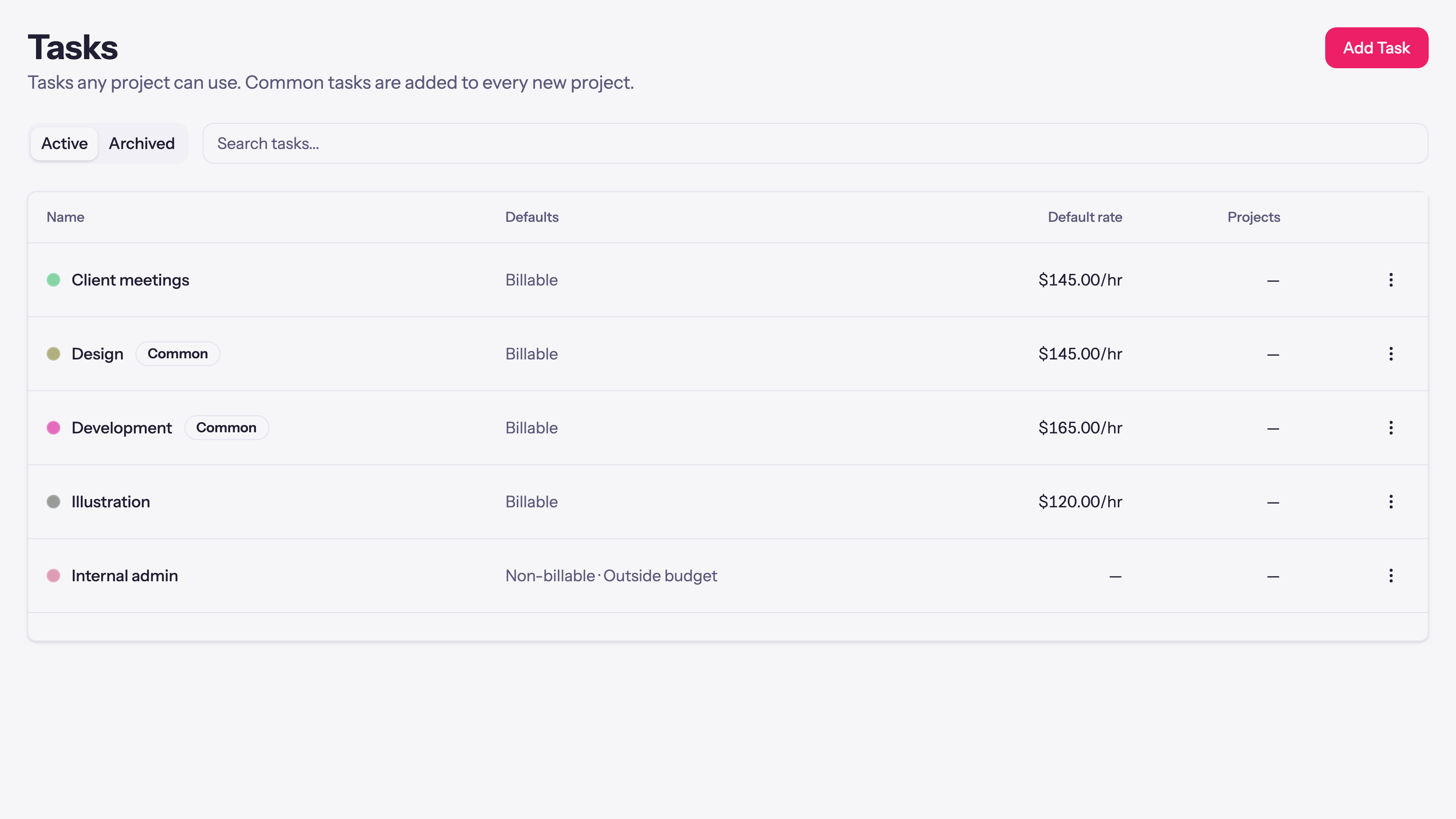
If every project in your workspace has a task called Design, they should all mean the same thing, sort together in a report, and not drift into "Design", "design", and "Design work" over a year. Quanta now has a task library: one shared list of tasks any project can draw from, with the names kept in step everywhere they're used.
One shared list
Open Tasks. This is the library: tasks any project can add, each with defaults for how it's billed, whether it counts toward the budget, a rate, and a colour.
- Common tasks are added to every new project automatically. Mark Design, Admin, and Meetings common and each new project starts with them, no setup.
- The name lives in the library. Rename Design here and every project using it follows, so a report grouped by task shows one Design row across the whole workspace instead of five near-misses.
- Archiving propagates. Retire a task in the library and it leaves every project's picker at once, while the time already tracked to it stays on your reports.
A project adds a library task from its own Tasks tab, and the settings it takes, billable or not, its rate, its budget, are the project's own from that point. Only the name and the archive state follow the library.
When a project needs its own wording
Sometimes one project really does need to call it something else. Each library task on a project has a Detach action: detach it and that copy keeps its settings and all its tracked time, stops following the library's name, and can be renamed right there for that project alone.
Task rates
Tasks can carry their own billable rate, which is useful when design bills at one number and development at another on the same project. Each project chooses how its time is priced on the Pricing tab:
- Project and person rates (the default): time is priced by the project's rate, or a person's rate where one is set.
- Task rates: each task's own rate prices the time tracked to it, falling back to the project rate for tasks without one.
When more than one rate could apply, Quanta resolves it in a fixed order: a person's rate on that project wins first, then the task rate, then the project rate, then the person's default, then the workspace default. Change a task's rate and you decide whether it re-prices existing time or only new entries.
Colours you'll actually see
Every task has a colour, and it now shows where you pick and read tasks, not just on the library page: a small dot beside the task in the timer's project picker, on the detailed report's new Task column and its task filter, on a project's time-entries tab, and in the timesheet review sheet. A library task carries one colour across every project that uses it, so the same task looks the same everywhere. Set a task's colour in the library and copies made from then on inherit it.
Bring tasks in when you import
Importing time from a CSV? When the same task name shows up across several projects, Quanta's import offers a Shared tasks panel: tick the ones that should become library tasks, set their billable, rate, common, and budget behaviour, and the import links every matching task across the projects to a single library task. A workspace migrated from Harvest lands with a real task library instead of hundreds of disconnected per-project tasks.
In short
The task library keeps your task names consistent across every project, adds the common ones to new work automatically, prices time by task where that fits, and shows a colour for each task throughout the app. Open Tasks to build the list, and pick a rate mode per project on its Pricing tab.
Questions, or a task workflow we don't cover? Email support@quanta.is.
— The Quanta team