Weekly Timesheet Approval in Quanta
Ask your team to submit their week, review hours by day and by project, and sign off in one place. With multi-level approval, minimum hours, automatic reminders, and weeks that lock once approved.
Quanta gives you plenty of ways to log time. What it hasn't had, until now, is a way for a manager to look at a week of hours and say: this is correct, lock it in. That changes today with weekly timesheet approval: your team submits their week, an approver reviews it and signs off, and the approved hours are locked from editing.
If you're coming from Toggl Track or Harvest and weekly approval was the thing holding you back, this is that workflow.
How it works
The cycle is simple, and there are only four states a week can be in: Not submitted, Awaiting approval, Approved, or Sent back.
- Each week, everyone in a timesheet group gets a timesheet for that week.
- When their hours are in, they submit the week. Submitting locks their entries.
- An approver reviews the week and either approves it or sends it back with a reason.
- Sent-back weeks unlock so the owner can fix things and resubmit. Approved weeks stay locked.
Approval is on for every workspace, but it stays quiet until you use it: nothing is created and nothing locks until you set up a timesheet group. Not your workflow? Uncheck Use weekly timesheets and approval in Settings under Administration (/admin/tenantSettings) and the timesheet screens disappear for your workspace.
Set up a timesheet group
A timesheet group defines who submits and who signs off. Open Timesheets and hit Timesheet groups to create one.
- Who is in this group. Pick Everyone in the workspace, which also picks up new people automatically as you add them, or select specific people. Run one group for the whole company or separate groups per team, each with its own rules.
- Approvers. Choose who signs off. Approvers don't need to be admins, and they don't need any special permissions. Being named an approver is enough.
- Minimum hours. Set the hours you expect in a week (say, 40). Weeks that come up short are flagged to the approver, and anyone submitting under the minimum has to include a note explaining why.
- Starts week of. When the group begins creating weekly timesheets.
- Reminders. Check Email a reminder to anyone who has not submitted, pick a day and time, and Quanta chases the stragglers for you.
Need a second pair of eyes? Add approver level. With two levels, a week needs both sign-offs before it counts as approved: a level-1 approver signs first, then the week moves to level 2. The status badge tells everyone where it stands, for example Awaiting approval 1/2. Groups can also be paused and resumed later.
Submitting your week
For your team, nothing about tracking time changes. List, Week, Grid, the desktop app: it all still works. The new part is a submit control on the week view. When the week's hours are in, hit submit, add an optional note for your approver ("Public holiday Monday, annual leave Thursday and Friday"), and you're done.
A few guardrails keep submissions honest: you can't submit a future week, a running timer has to be stopped first, and if your workspace requires a project or description on every entry, the week is checked before it goes in.
Once submitted, the week's entries are locked, so the numbers your approver reviews are the numbers that stay. Submitted too early? Withdraw the submission and your hours unlock again. And if a week is sent back, the reason is right there on the week view, so you know exactly what to fix before resubmitting.
Everyone also gets a My timesheets page: every week, its hours, its status, and who it's currently waiting on.
Reviewing and approving
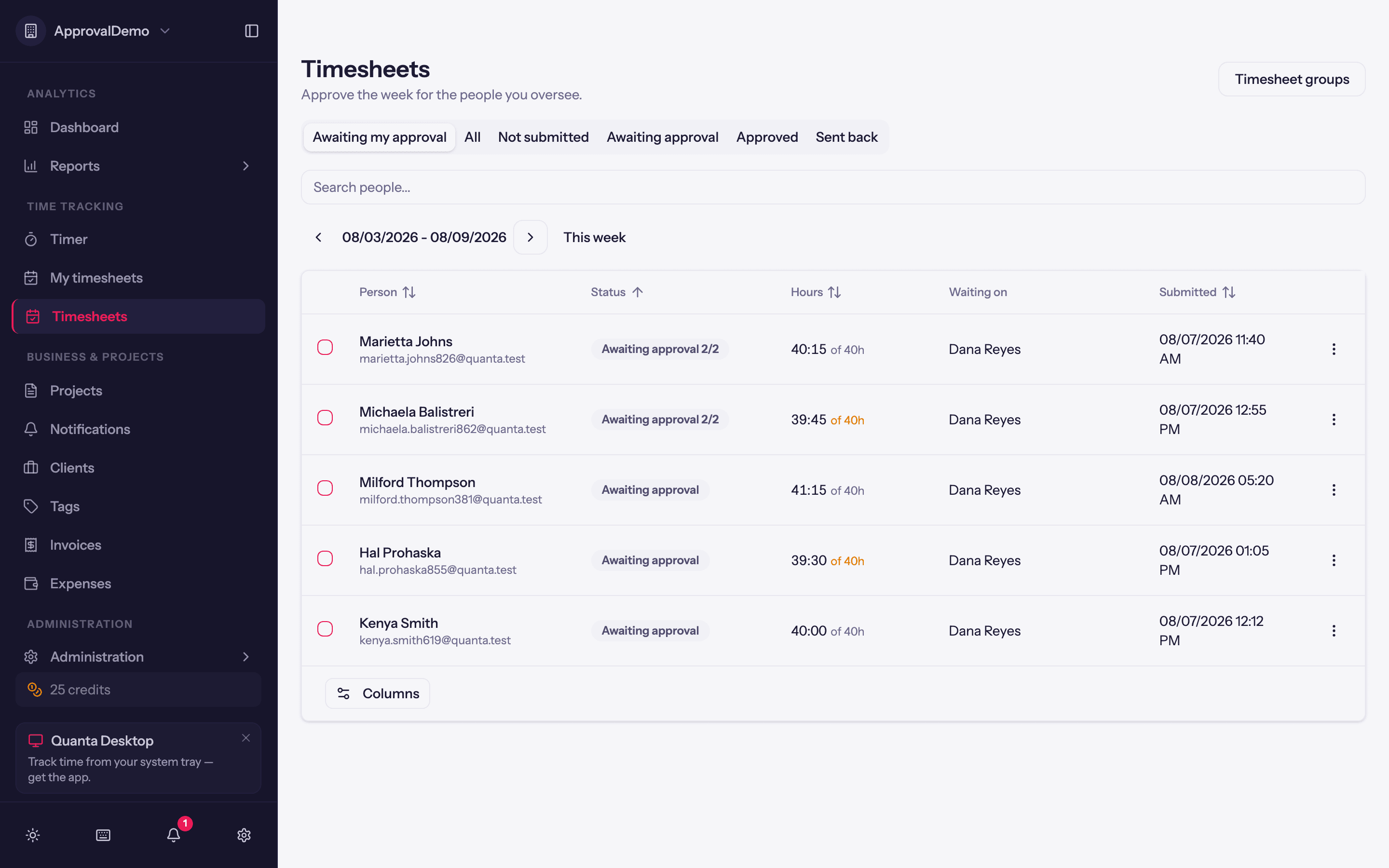
Approvers get the Timesheets page, which opens on the only tab that matters day to day: Awaiting my approval. You can also flip to All, Not submitted, Awaiting approval, Approved, or Sent back, step week by week, and search by person.
The list is built for chasing a week to done. Hours show against the group's minimum ("39:30 of 40h") with shortfalls in amber, even for weeks not submitted yet, so you can see who's behind before Friday. A Waiting on column names the approver each week is stuck with.
Hit Review on any row to see the week without leaving the page: totals against the expected hours, the submitter's note, hours by day, and hours by project and task.
From there, two buttons:
- Approve. The hours stay locked. If the group has a second approval level, the week moves to the next approver instead of completing.
- Send back. You'll type a reason, because a rejection without one isn't actionable. The week unlocks and the owner is told what to fix.
Got a clean batch? Select rows with the checkboxes and approve them all at once. And when someone is away and never submitted, an admin or approver can approve the week anyway. Quanta makes that explicit: the confirmation warns you the week was never submitted and will be locked exactly as it stands.
The emails write themselves
Nobody has to remember to nudge anybody:
- When a week is submitted, its approvers get an email with a link straight to the review.
- When a week is sent back, the owner gets an email that includes the reason.
- On the group's reminder day, anyone who hasn't submitted gets a nudge.
Approved hours and your invoices
Approval and billing run on separate schedules, so Quanta doesn't stop you invoicing time that hasn't been approved yet. It just makes sure you know. When you pull time onto an invoice, unapproved hours are called out, both as a warning when the invoice loads and on each affected line item, so you can check the timesheets first if that matters for the client.
Changed your mind?
Turning approval off is safe. The timesheet pages disappear, weekly creation and reminders stop, and any week still awaiting approval is returned to its owner, unlocked. Approved weeks stay locked and your groups are kept, so turning it back on later resumes where you left off.
In short
Put your team in a timesheet group, and every week takes care of itself: hours get submitted, reminders chase the stragglers, approvers review by day and by project, and signed-off weeks are locked for good. It's the same review-before-it-counts philosophy as our expense approvals, now for the hours themselves.
Questions, or an approval flow we don't cover? Email support@quanta.is.
— The Quanta team