The project page
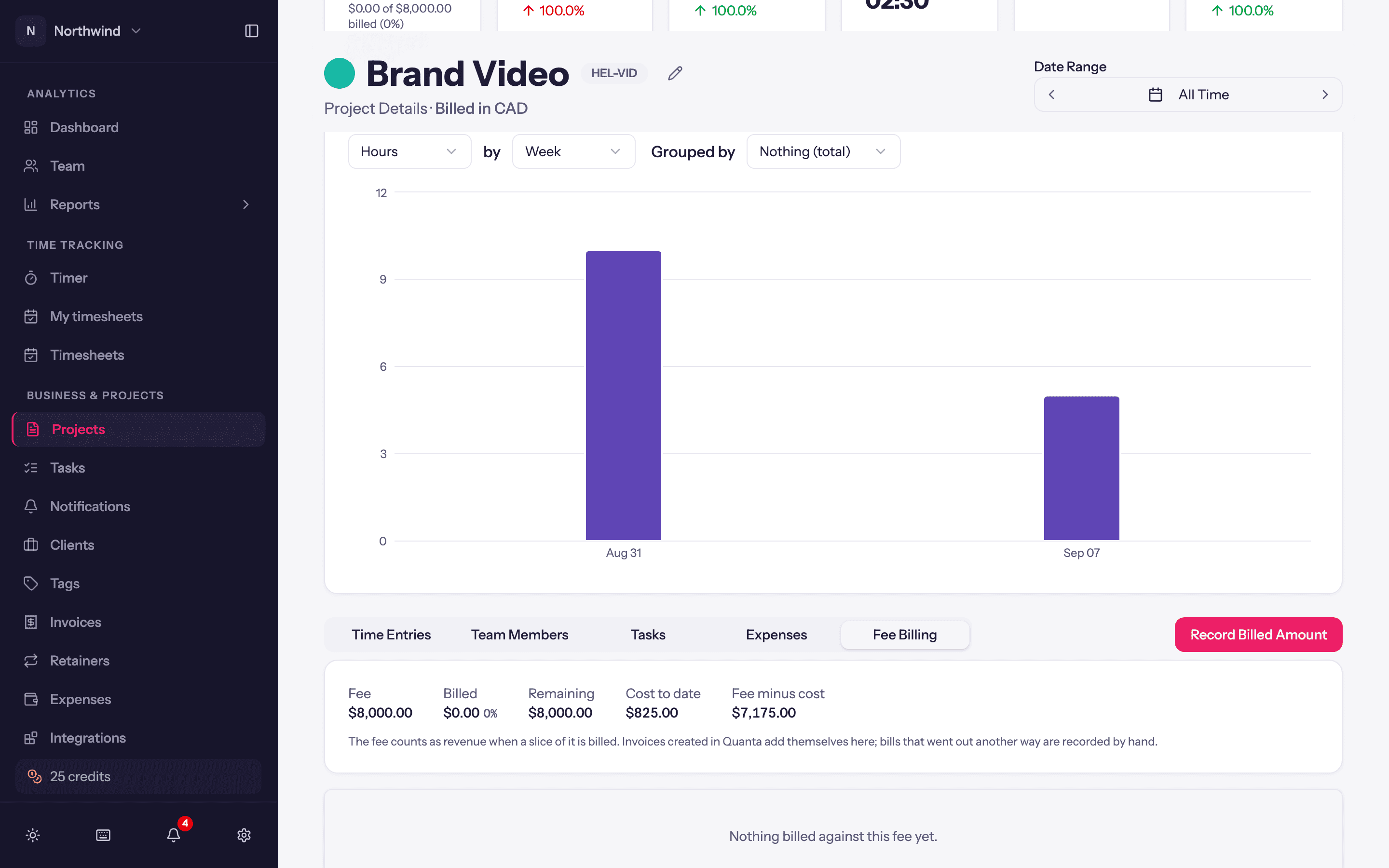
One project in depth: stats, the hours chart, and the Time Entries, Tasks, Team Members, Expenses and Fee Billing tabs.
Click a project's name on the Projects page, or View in its row menu. What you see depends on your role on the project (see Project team); Admins and Managers see everything described here.
Header and stats
The sticky header shows the Project Type, Client, whether Hourly Billing and Tasks are enabled, a date range picker that scopes everything on the page, and an Edit button for Admins. The project's Notes sit just below it. Two switches control the numbers:
- Hide revenue numbers blanks the money on this page, for screen-sharing.
- Rounding rounds durations the way the workspace does (Workspace Settings → Rates) for the numbers on this page.
The stat cards cover Total Hours, Time Entries, Avg Hours / Entry, Avg Daily Hours, and for money Total Revenue, Total Cost and Total Profit. A fixed-fee project shows Fee remaining instead of revenue, and a project with a budget shows a budget card with a Recalculate budget button. A project on a retainer shows the retainer's balance.
The chart
Hours, Revenue, Cost or Entries by Day, Week or Month, Grouped by nothing (a single total), User or Task. When grouped, a Full breakdown list under the chart shows the exact figure per person or task. The header's date range applies.
Tabs
Time Entries
Every entry on the project, filterable by All Users, All Tasks and date. From here Admins can Edit an entry in the full editor, Delete it, or Unlock a locked one. The Download button exports the filtered entries to Excel.
Tasks
The project's tasks with hours; per-task budgets add allocated, spent and progress columns. Add Task, Add from Library, and per-row Edit, Archive, Detach from library and Remove Task. See Tasks.
Team Members
The roster with each person's role, hours and (for Managers) rates. Add Team Member, Edit Member and Remove Team Member. Members cannot open this tab. See Project team.
Expenses
Expenses logged against the project, with Add Expense, per-row Edit, Delete and Download receipt. Hidden when the project does not allow expenses. See Expenses.
Fee Billing
Fixed-fee projects only. Shows Billed, Remaining, Cost to date and Fee minus cost, and a ledger of every slice billed against the fee: invoices raised in Quanta, plus anything you Record Billed Amount for a slice billed outside Quanta (amount, Billed on date, a Note such as the external invoice number). Recorded amounts draw the fee down and count as revenue on that date; a recorded amount can be removed again.