Detailed report
Every time entry in the period, filterable, exportable, editable, lockable, and open to questions from AI Insights.
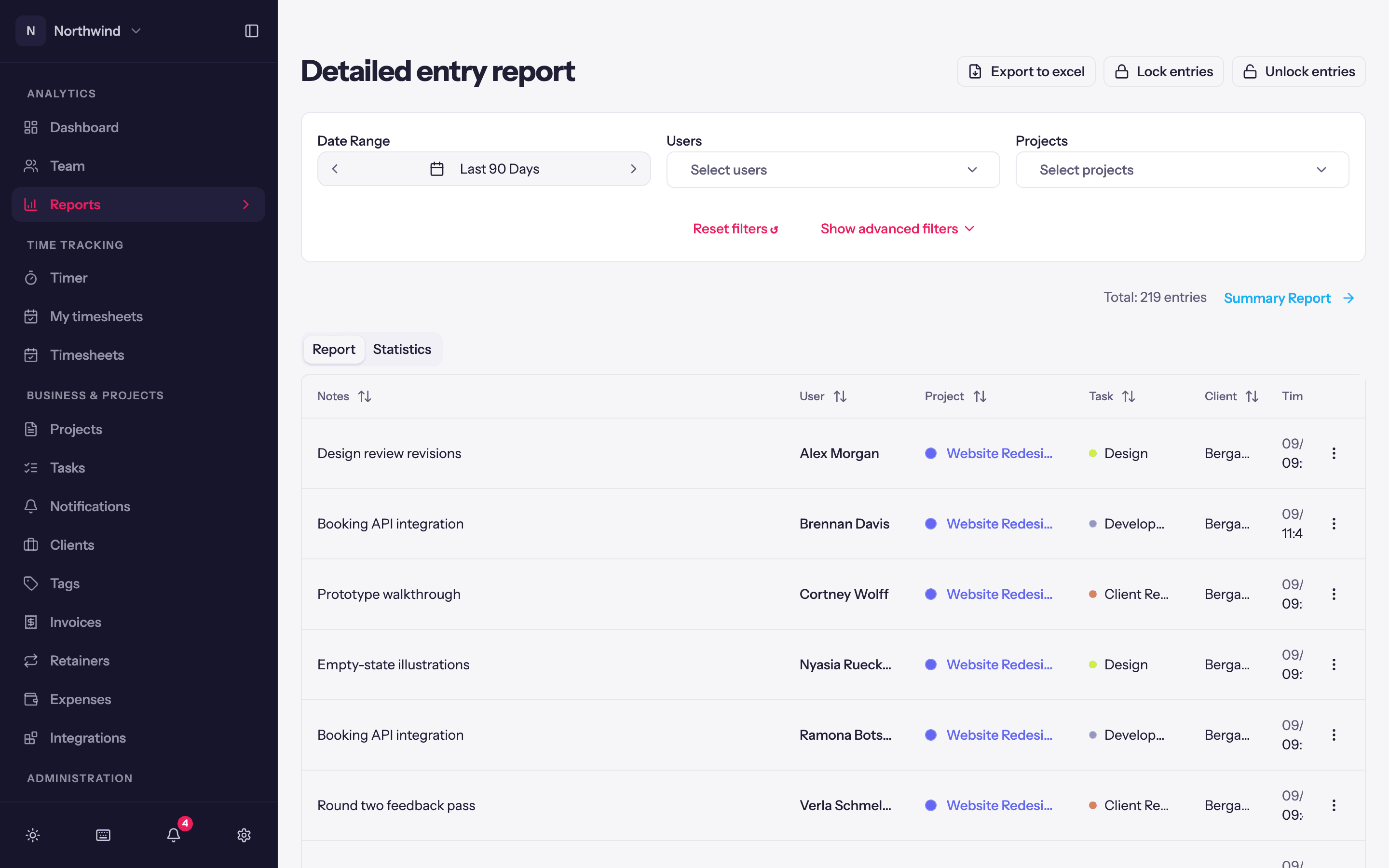
Analytics → Reports → Detailed Report is the entry-level report: one row per time entry. Users see their own; report-permission holders see everyone's and can edit, move, lock, unlock and delete them in bulk.
Filters
Date Range, Users, Projects, and under Show advanced filters: Clients, Tasks, Tags, Currencies, Rounding, Include amounts, Billable / Non-billable and Invoiced / Uninvoiced. Users can be filtered to Active or Deactivated people. Reset filters ↺ clears everything.
The table
Columns: Notes, User, Project, Task, Client, Time, Duration, plus amounts when Include amounts is on and a Source column (web, desktop, imported, API). Sort by any column header; Columns shows or hides them; the pager at the bottom moves through long ranges.
Locked entries show a lock icon. The ⋯ menu on a row offers Edit (opens the full editor with billable, invoiced and rate overrides; see Editing entries), Delete, and Unlock for a locked entry.
The Report and Statistics tabs switch between the table and the period's totals (Total Profit, Total Revenue, Total Hours, Number of Time Entries) with a hours-by-week chart.
Bulk actions
Tick the checkbox on any row and a bar appears above the table showing how many entries are selected and what you can do with them. The checkbox in the header takes the whole page; when your filters match more than one page, Select all N matching extends the selection to every entry the filters cover, not just the page in front of you.
- Move to project… opens a picker: choose the project, and optionally a task on it. The entries are re-priced at the new project's rates and the budgets on both sides update. Tasks belong to the old project, so they are cleared unless you pick a new one.
- Mark as opens a menu: Invoiced elsewhere (they leave the uninvoiced report and are not offered when creating an invoice) or Not invoiced; Billable (rates are resolved from the project) or Non-billable (billable amounts are cleared); and Locked or Unlocked, each shown only if you hold that permission.
- Delete… removes the selected entries. It cannot be undone from the app.
- Clear drops the selection.
Every action asks first, naming the count. Entries that cannot change are skipped rather than blocking the rest, and the confirmation afterwards counts them with the reason: Marked as invoiced elsewhere 1,150 entries · 3 skipped: on an invoice. Entries on a Quanta invoice, in a submitted week, locked entries, and entries belonging to someone else are the usual skips.
Locking is how you freeze a month once it has been invoiced or paid out. See Locked entries.
Export to Excel
Export to excel opens Choose export columns: tick what to include (Date, User, Email, Client, Project, Task, Description, Tags, Source, Duration, Billable, Invoiced, and the financial columns Currency, Billable Rate, Revenue, Cost Rate, Cost), choose the Format (Excel or CSV), Split name into first and last columns, and apply Rounding. Your column choice is remembered. Reset to defaults restores the standard set.
AI Insights
With AI on, the AI Insights button opens a chat panel over the currently filtered entries: "Which client took the most time last month?", "Summarise what Alex worked on this week". It suggests a few prompts, estimates the credits before running, and keeps each conversation so you can come back to it. See AI credits.