Uninvoiced report
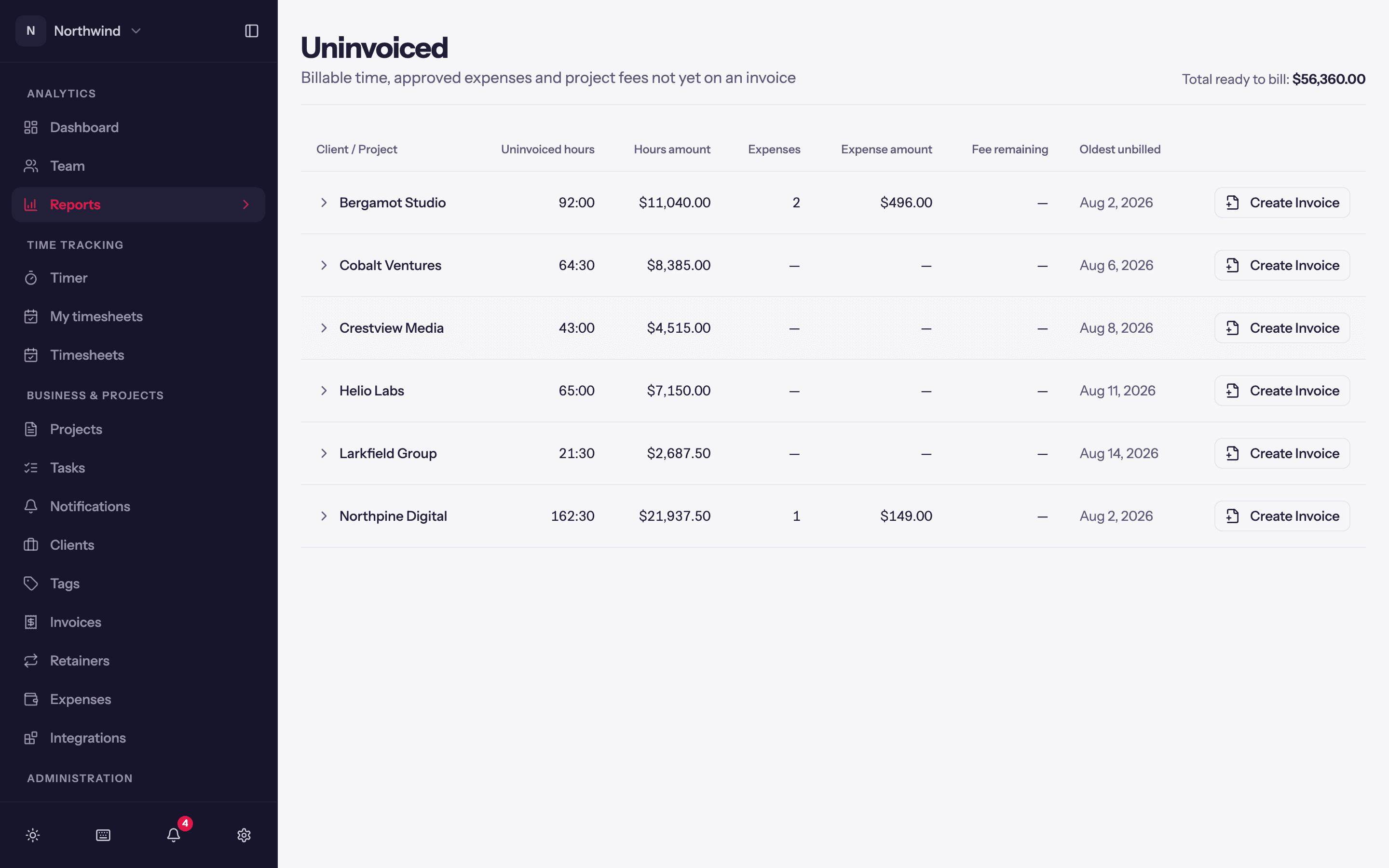
Billable time, approved expenses and project fees that are not yet on an invoice, per client, with a Create Invoice button on every row.
Analytics → Reports → Uninvoiced is the "what can I bill right now?" page. It needs the Invoices permission.
What it shows
Total ready to bill at the top, then one row per client (expand it for its projects) with:
- Uninvoiced hours and their Hours amount at the entries' billable rates.
- Expenses (approved and billable, not yet invoiced) and their Expense amount.
- Fee remaining on fixed-fee projects.
- Oldest unbilled: the date of the oldest entry still waiting, a quick way to see who is overdue for an invoice.
Archived projects are marked. Projects with Invoice through Quanta switched off are left out, as is non-billable time. When everything is billed the page says so: Nothing to bill.
Create an invoice
Create Invoice on a row opens the invoice sheet with that client selected and everything uninvoiced pre-imported. Review the lines, adjust grouping if you like, and Create Invoice. See Creating invoices.
Reconciling with the Detailed report
The Detailed report filtered to Billable + Uninvoiced for the same client and period should match this page's hours. If it does not, look for entries on projects with invoicing switched off, or non-billable entries, which this page excludes on purpose.